备注
Go to the end to download the full example code.
嵌入(Embedding)
AgentScope 中,嵌入模块提供了用于向量生成的统一接口,具有以下特性:
支持 缓存 embedding 以避免冗余的 API 调用
支持 不同 embedding API 提供商 并提供一致的接口
AgentScope 内置支持以下 API:
API 提供商 |
类 |
|---|---|
OpenAI |
|
Gemini |
|
DashScope |
|
Ollama |
|
所有类都继承自 EmbeddingModelBase,实现了 __call__ 方法并生成包含嵌入和使用信息的 EmbeddingResponse 对象。
其中 DashScopeMultiModalEmbedding 支持文本,图像和视频的多模态嵌入。
以 DashScope 嵌入类为例,可以按如下方式使用:
import asyncio
import os
import tempfile

from agentscope.embedding import DashScopeTextEmbedding, FileEmbeddingCache


async def example_dashscope_embedding() -> None:
    """DashScope 文本嵌入的使用示例。"""
    texts = [
        "法国的首都是什么?",
        "巴黎是法国的首都城市。",
    ]

    # 初始化 DashScope 文本嵌入实例
    embedding_model = DashScopeTextEmbedding(
        model_name="text-embedding-v2",
        api_key=os.getenv("DASHSCOPE_API_KEY"),
    )

    # 从模型获取嵌入
    response = await embedding_model(texts)

    print("嵌入 ID: ", response.id)
    print("嵌入创建时间: ", response.created_at)
    print("嵌入使用情况: ", response.usage)
    print("嵌入向量:")
    print(response.embeddings)


asyncio.run(example_dashscope_embedding())
Traceback (most recent call last):
  File "/Users/hjt0309/Documents/AI_project/agentscope_doc/agentscope-main/docs/tutorial/zh_CN/src/task_embedding.py", line 65, in <module>
    asyncio.run(example_dashscope_embedding())
  File "/opt/miniconda3/lib/python3.12/asyncio/runners.py", line 194, in run
    return runner.run(main)
           ^^^^^^^^^^^^^^^^
  File "/opt/miniconda3/lib/python3.12/asyncio/runners.py", line 118, in run
    return self._loop.run_until_complete(task)
           ^^^^^^^^^^^^^^^^^^^^^^^^^^^^^^^^^^^
  File "/opt/miniconda3/lib/python3.12/asyncio/base_events.py", line 686, in run_until_complete
    return future.result()
           ^^^^^^^^^^^^^^^
  File "/Users/hjt0309/Documents/AI_project/agentscope_doc/agentscope-main/docs/tutorial/zh_CN/src/task_embedding.py", line 56, in example_dashscope_embedding
    response = await embedding_model(texts)
               ^^^^^^^^^^^^^^^^^^^^^^^^^^^^
  File "/Users/hjt0309/Documents/AI_project/agentscope_doc/agentscope-main/src/agentscope/embedding/_dashscope_embedding.py", line 153, in __call__
    res = await self._call_api(batch_kwargs)
          ^^^^^^^^^^^^^^^^^^^^^^^^^^^^^^^^^^
  File "/Users/hjt0309/Documents/AI_project/agentscope_doc/agentscope-main/src/agentscope/embedding/_dashscope_embedding.py", line 87, in _call_api
    raise RuntimeError(
RuntimeError: Failed to get embedding from DashScope API: {"status_code": 401, "request_id": "03621f9c-770c-46b6-b099-59d50d0f9a9c", "code": "InvalidApiKey", "message": "Invalid API-key provided.", "output": null, "usage": null}
可以通过继承 EmbeddingModelBase 并实现 __call__ 方法来自定义 embedding 模型。
Embedding 缓存
AgentScope 提供了用于缓存 embedding 的基类 EmbeddingCacheBase,以及基于文件的实现 FileEmbeddingCache。
它在 embedding 模块中的工作方式如下:
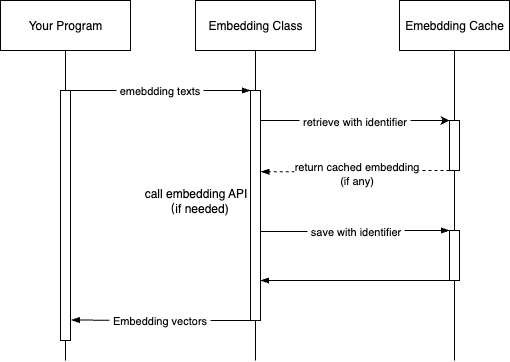
要使用缓存,只需将 FileEmbeddingCache 实例(或自定义缓存)传给模型的构造函数,如下所示:
async def example_embedding_cache() -> None:
    """演示带有缓存功能的 embedding。"""
    # 示例文本
    texts = [
        "法国的首都是什么?",
        "巴黎是法国的首都城市。",
    ]

    # 为缓存演示创建临时目录
    # 在实际应用中,建议使用持久目录以最大发挥缓存效果
    cache_dir = tempfile.mkdtemp(prefix="embedding_cache_")
    print(f"使用缓存目录: {cache_dir}")

    # 使用缓存初始化嵌入模型
    # 为演示目的,我们将缓存限制为 100 个文件和 10MB
    embedder = DashScopeTextEmbedding(
        model_name="text-embedding-v3",
        api_key=os.getenv("DASHSCOPE_API_KEY"),
        embedding_cache=FileEmbeddingCache(
            cache_dir=cache_dir,
            max_file_number=100,
            max_cache_size=10,  # 最大缓存大小(MB)
        ),
    )

    # 第一次调用 - 将从 API 获取并存储在缓存中
    print("\n=== 第一次 API 调用(无缓存命中)===")
    start_time = asyncio.get_event_loop().time()
    response1 = await embedder(texts)
    elapsed_time1 = asyncio.get_event_loop().time() - start_time
    print(f"来源: {response1.source}")  # 应该是 'api'
    print(f"耗时: {elapsed_time1:.4f} 秒")
    print(f"使用的 token: {response1.usage.tokens}")

    # 使用相同文本的第二次调用 - 应该使用缓存
    print("\n=== 第二次 API 调用(预期缓存命中)===")
    start_time = asyncio.get_event_loop().time()
    response2 = await embedder(texts)
    elapsed_time2 = asyncio.get_event_loop().time() - start_time
    print(f"来源: {response2.source}")  # 应该是 'cache'
    print(f"耗时: {elapsed_time2:.4f} 秒")
    print(
        f"使用的 token: {response2.usage.tokens}",
    )  # 缓存结果应该为 0
    print(
        f"速度提升: 使用缓存快 {elapsed_time1 / elapsed_time2:.1f} 倍",
    )


asyncio.run(example_embedding_cache())
Total running time of the script: (0 minutes 0.218 seconds)